
Chess
Demonstration project — provided as an example of what the PixelRoot32 Game Engine can do. It is not a product: parts may be incomplete, experimental, or deliberately simplified to keep one idea in focus.
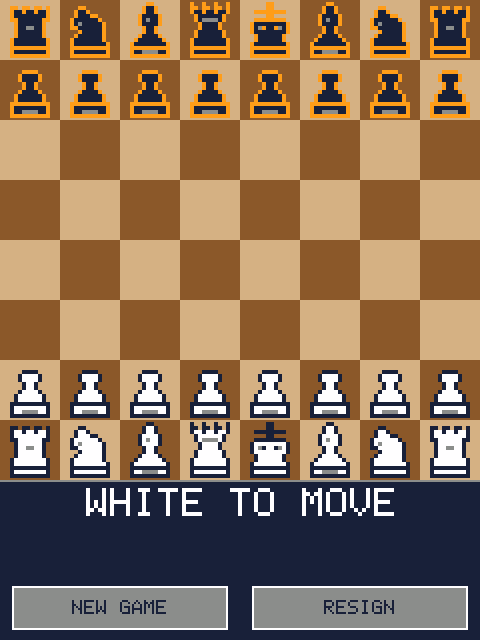
Two players share one device and take turns dragging pieces across the board. Every traditional rule is implemented: castling, en passant, promotion, check, checkmate, stalemate, the fifty-move rule, threefold repetition and insufficient material.
What this demo is really about is the separation between rules and presentation. Everything in src/chess/ is pure data and pure functions with no engine dependency at all, which is what makes it testable on the host: the suite in test/ verifies move generation with perft against five published reference positions. The scene layer owns no rules; it turns touch gestures into calls and draws what it is told.
The same split runs one level further out. ChessSfx and ChessEffects are told what happened — a knight was taken on this square — and decide for themselves what that sounds and looks like. That is what keeps the engine's audio and particle headers, and their feature guards, out of ChessScene entirely.
Language: C++17
Engine: gperez88/PixelRoot32-Game-Engine@^1.9.0
Environments: native, esp32cyd, host_test
Category: Games
Requirements (build flags)
Set in lib/platformio.ini:
| Flag | Set to | Why |
|---|---|---|
PIXELROOT32_ENABLE_TOUCH | 1 | Touch is the only input this demo has. Its default is 0, and with it off the game compiles, runs, and never receives a single event. |
PIXELROOT32_ENABLE_4BPP_SPRITES | defined | Pieces are 4bpp sprites, the same format the other engine demos use. |
PIXELROOT32_ENABLE_UI_SYSTEM | 0 | The HUD is two buttons hit-tested with a rectangle test in the scene. UIManager would only add flash. |
PIXELROOT32_ENABLE_AUDIO | 1 | Move, capture, check and checkmate cues. This is the most expensive gate in the demo: roughly 17 KB of RAM, nearly all of it the scheduler's own buffers. |
PIXELROOT32_ENABLE_PARTICLES | 1 | Debris thrown off a captured square. One emitter, fixed 50-particle pool, ~1.3 KB RAM. |
PIXELROOT32_ENABLE_CAMERA_EFFECTS | 1 | The screen shake on a capture. The board never scrolls, so this flag is the only reason a camera exists in the demo at all. |
PIXELROOT32_ENABLE_PHYSICS | 0 | Nothing collides; legality is decided by the rules core, not by geometry. |
PIXELROOT32_ENABLE_SCENE_TRANSITIONS | 0 | Default 1. There is exactly one scene. |
PIXELROOT32_ENABLE_STATIC_TILEMAP_FB_CACHE | 0 | Default 1. Nothing here draws a tilemap. |
Palette selection has its own three flags — see Palettes.
Engine features are compile-time modular, and a missing flag is usually not a compile error — it is a black screen or a dead panel. Turning _TOUCH off here gives you a board that renders and never responds.
The three optional ones degrade cleanly instead: -D PIXELROOT32_ENABLE_AUDIO=0, -D PIXELROOT32_ENABLE_PARTICLES=0 and -D PIXELROOT32_ENABLE_CAMERA_EFFECTS=0 each still compile and simply drop that feedback channel. No call site changes.
The sprite-depth flags are
#ifdef-tested, not#if-tested.PIXELROOT32_ENABLE_2BPP_SPRITESand_4BPP_SPRITESare checked with#ifdef(include/platforms/EngineConfig.h:399), so any value turns them on. Writing-D PIXELROOT32_ENABLE_2BPP_SPRITES=0links the 2bpp blitter in. Define the depths you want and omit the rest — which is why the 2bpp flag does not appear inlib/platformio.iniat all. The same trap applies to_SCENE_ARENA,_TILE_ANIMATIONS,_PROFILINGand_ENABLE_DEBUG_OVERLAY.
Palettes
A Color is an index, not a colour. Color::Magenta is #CECECE under PR32 and something else entirely under GB. So the palette the engine has loaded decides what every colour in this demo actually looks like, and the demo now says which one that is instead of riding the default.
Set in lib/platformio.ini, applied by applyPalettes():
| Flag | Default | Effect |
|---|---|---|
CHESS_BACKGROUND_PALETTE | PR32 | The board squares. Any PaletteType: PR32, NES, GB, GBC, PICO8. |
CHESS_SPRITE_PALETTE | PR32 | The pieces, highlights, HUD and debris. |
CHESS_CUSTOM_BACKGROUND | 0 | 1 draws the board through the generated 16-slot table instead. |
The board and the pieces run on separate palettes — dual palette mode — so either reskins without touching the other.
Changing them
There are three different things a developer usually means by "change the colours", and they are edited in three different places.
1. Swap in one of the engine's palettes. One flag, nothing to regenerate:
-D CHESS_BACKGROUND_PALETTE=GB ; Game Boy board, PR32 pieces2. Stay on PR32, use different slots. If the board should be blue instead of green, that is not a palette change — it is a change of which index the board asks for. Board squares, highlights and HUD live in src/ChessConstants.h; the piece outline, body and accent live in WHITE_PALETTE / BLACK_PALETTE in tools/generate_pieces.py. Editing the piece side means re-running the generator.
3. Ship your own 16-colour table. Add it to PALETTES in the generator, point CUSTOM_PALETTE at it, regenerate, and turn the flag on:
# tools/generate_pieces.py — RGB888, one entry per slot
SLATE = dict(PR32)
SLATE[14] = (0xC4, 0xCE, 0xDA)   # light square
SLATE[5]  = (0x3A, 0x4A, 0x5C)   # dark square

PALETTES = {"PR32": PR32, "Wood": WOOD, "Slate": SLATE}
CUSTOM_PALETTE = "Slate"python tools/preview_board.py slate.png Slate # look at it first
python tools/generate_pieces.py # emits ChessCustomPalette.h-D CHESS_CUSTOM_BACKGROUND=1The table is generated, never hand-written, so check_contrast() can validate it like any other. rgb565() rounds rather than truncates, and check_packing() holds it to the engine's own PALETTE_PR32 slot for slot — >> 3 and >> 2 reproduce only about half that table, so a hand-packed palette would quietly shift every slot it meant to leave alone.
What the guard does and does not cover.
check_contrast()walks the entries inPALETTES— PR32 and Wood as shipped, plus anything you add. It knows nothing aboutNES,GB,GBCorPICO8: those live inside the engine, and selecting one withCHESS_BACKGROUND_PALETTEis not checked.preview_board.pycannot render them either. Switching to a built-in is a whole-board recolour you will see immediately on screen — just do not read the guard's silence as approval of it.
Two things that are easy to get wrong
Dual mode alone does not split anything. Only primitives — rectangles, lines, circles, text — consult the render context, and they fall back to PaletteContext::Sprite when none is set. Sprite4bpp ignores the context entirely and always resolves through the sprite palette slot. So the board squares reach the background palette only because drawBoard() opens a PaletteScope; without it the background palette would be configured and never read. PaletteScope restores the previous context on the way out rather than clearing it, which is what makes nesting safe — and the renderer stores a pointer to the context, so the value has to outlive the drawing.
setDualPalette() does not move currentPalette. The engine keeps three pointers, and the single-argument resolveColor(Color) reads currentPalette while ignoring dual mode completely. ParticleEmitter resolves through exactly that overload. Call only the dual setter and the capture debris keeps the old palette while everything else moves — no error, no obvious cause. setPalette() is therefore called first, because it is the one call that points all three at once.
Whatever you pick, re-run python tools/generate_pieces.py. Its check_contrast() runs once per registered palette and fails the run rather than shipping a piece outline nobody can see — a colour that reads under PR32 can still vanish under a custom table, because a Color is a slot number and what it looks like is whatever table is loaded. That is not hypothetical: the dark pieces were rimmed in Color::Magenta — the light square's own #CECECE — until the guard existed to catch it.
Platforms
| Environment | Display | Touch | Audio |
|---|---|---|---|
native | SDL2 window, 240×320 | mouse, forwarded to the touch dispatcher by SDL2_Drawer | SDL2_AudioBackend, 22050 Hz |
esp32cyd | ILI9341 240×320 (ESP32-2432S028 "Cheap Yellow Display") | XPT2046 resistive, on its own GPIO bus (32/39/25/33, IRQ 36) | onboard speaker on the internal DAC, GPIO 26 |
There is no esp32dev environment: the generic ST7789 board this demo started from has no touch panel, and touch is the whole interaction model. (esp32cyd does set board = esp32dev — that names the MCU module the CYD is built on, not a second target.)
Touch calibration
The XPT2046 flags in platformio.ini match the 2432S028: the ADC axes are swapped relative to the display and X is mirrored after the swap. If taps land offset on your unit, touch the four corners with the serial monitor open and retune XPT2046_RAW_X_LO / _HI and XPT2046_RAW_Y_LO / _HI.
Screen layout
 0   ┌────────────────────────┐
     │                        │
     │   board, 8 × 30 px     │  240 × 240
     │   white at the bottom  │
240  ├────────────────────────┤
     │ WHITE TO MOVE          │  status
     │ captured pieces        │  two trays
     │ [NEW GAME]  [RESIGN]   │  buttons
320 └────────────────────────┘30 px per square is the largest cell size that divides the 240 px panel evenly. Pieces are 28×28 Sprite4bpps stored at their final size, leaving a 1 px margin inside the cell. They are stored rather than scaled because the renderer has no scaled draw for Sprite4bpp — only the 1bpp Sprite and MultiSprite paths take a scale factor — so the generator emits the board size and the 14 px tray size as two separate bitmaps.
Controls
Touch only.
| Action | How |
|---|---|
| Move a piece | Press it and drag. Legal destinations appear as dots, captures as rings, and the square under your finger is outlined. Release on it. |
| Cancel | Release off the board, or on any square the piece cannot reach. Pressing and releasing without moving also puts the piece straight back down. Nothing moves. |
| Promote | The picker opens over the board; tap queen, rook, bishop or knight. Tapping outside cancels the move. |
| New game | Tap NEW GAME. |
| Resign | Tap RESIGN. The other player wins. |
Pieces move by dragging, not by tapping twice. The engine's touch state machine makes the two impossible to confuse: a release that followed a drag emits only DragEnd, with no TouchUp and no Click, so a piece dropped near the bottom of the board can never also press a HUD button.
A carried piece is drawn half a square above the finger so it stays visible. Aiming goes by the outlined square under the finger, not by the piece.
The board also shows the previous move (cyan outline on both squares) and a red double outline on a king that is in check.
Capture feedback
Taking a piece jolts the board and throws debris off the square, sized by what was taken — see src/effects/ChessEffects.cpp:
| Captured | Shake | Debris |
|---|---|---|
| Pawn | 2 px, 110 ms | 16 particles |
| Knight, bishop | 3 px, 160 ms | 26 |
| Rook | 4 px, 200 ms | 36 |
| Queen | 5 px, 260 ms | 46 |
Trading pawns happens constantly and must not become annoying; losing a queen should be felt.
The counts sit just under MAX_PARTICLES_PER_EMITTER, which is 50 and is a hard engine boundary. Filling that pool is close to free: the emitter's update and draw loops run over all 50 slots every frame no matter how many particles are alive, so a bigger burst adds no iteration at all — only a colour interpolation and one 2×2 blit per particle that is actually live, and only while it is live. Going past 50 means a second emitter, which costs about 1.3 KB of RAM and a second permanent 50-slot loop every frame even when the board is still. That is the trade worth weighing, not the count.
The debris runs on its own clock
ParticleEmitter::update() ignores the delta it is handed and ages every particle by exactly one step per call — a lifetime is counted in calls, not in seconds. Stepping it once per frame would therefore tie a burst to the frame rate, and the two targets here are nowhere near each other: the native loop has no cap beyond SDL_Delay(1) and runs several hundred frames a second, which burns a 28-step life in well under a tenth of a second, while the CYD's ~25 fps stretches the same burst past a second. That is what made the first version of this effect nearly invisible on the simulator.
ChessEffects accumulates milliseconds and steps the emitter at a fixed 25 Hz instead, capped at two steps per frame so a stalled frame cannot spend a whole burst at once. A burst lasts the same 0.5–1.1 s of wall-clock time on both targets, and on native it is strictly less work than stepping every frame.
Particles are drawn as fixed 2×2 rectangles — the size is not configurable — so count, spread and lifetime are the only levers on how visible a burst is.
The shake is a renderer offset applied for one drawing pass, so it moves the board, the pieces and the debris — and nothing else. The HUD and the promotion picker are drawn outside that pass on purpose: a jolt that moved the buttons would make them harder to hit, which is the opposite of feedback. While the board is offset, one or two screen edges expose whatever beginFrame() left there; with dirty regions off, as this demo builds, that is a full clear, so the gap reads as a clean black border.
En passant is the one capture whose victim is not standing on the destination square, so the burst is placed on the captured pawn rather than on the square the capturing pawn landed on.
Three engine details shape this code:
- The two gates are not symmetric.
CameraEffects.hships a same-signature stub whenPIXELROOT32_ENABLE_CAMERA_EFFECTSis0, so shake calls compile either way.ParticleEmitter.hhas no stub — the entire header sits inside its#if— so every particle member and call needs a guard. That is why the emitter lives inChessEffectsand not inChessScene. - Debris must never fade to
Color::Black. Particles interpolate from their start colour to their end colour over their life, andColor::Blackis RGB5650x0000— the byte the 8bpp framebuffer reads as transparent. A fade to black is a fade to nothing on the ESP32 while looking correct under SDL2. This rules outParticlePresets::Explosionand::Smoke, which both end onColor::Black. - Both ends of the fade are high-luminance. Half the board is DarkGreen
#0E7A0D, so a bright-to-dark fade reads on the light squares and sinks into the dark ones. The demo goes Yellow#FFD500→ Orange#FF9F1Cand lets the staggered lifetimes thin the burst out instead of dimming it.
CameraEffectsSystem::getOffset() also draws fresh random numbers on every call, so the whole pass is built from a single sample — two calls in one frame would tear the board against its own pieces.
Sound
Four cues, defined in src/assets/audio/ChessSfx.cpp:
| Cue | What it is |
|---|---|
| Move | A 55 ms triangle blip falling G4→D4 — a piece being set down. Deliberately quiet: you hear it forty times a game. |
| Capture | Two layers at once: a noise transient for the impact, and a pulse falling 260→90 Hz on an exponential curve for the weight under it. |
| Check | A two-step rise D5→A5 on a 25% duty pulse. Narrow duty keeps it audible over the move cue, which plays underneath it. |
| Checkmate | A four-step descent C5→G#4→F4→C4 with a low triangle pedal. It plays alone — no capture thud under it. |
Check and checkmate are pitch envelopes, not sweeps: a pitch envelope holds between breakpoints instead of gliding, so the points read as separate notes. Four is the ceiling (kMaxSfxPitchPoints).
There are no InstrumentPresets here on purpose. A preset is a 17-field aggregate and AudioEvent::preset is field 7, not the last one, so a positional brace-init that looks correct silently produces the wrong sound rather than failing to build. Every field is assigned by name instead.
Effects share the four-slot SFX voice subpool (voices 4–7) and can only steal from each other, so the busiest moment — a capture that also gives check, three voices — still fits.
ChessSfx.h exposes nothing but an enum and playSfx(). The scene reports what happened; choosing a waveform is the audio module's job, and keeping the audio headers out of the scene is what lets the whole thing be driven under test without the APU library.
Speaker pin. GPIO 26 is DAC2 and is where the speaker sits on the common ESP32-2432S028. Board revisions vary; DAC1 is GPIO 25, and the internal DAC does not exist at all on the S3 or C3.
Build with -D PIXELROOT32_ENABLE_AUDIO=0 for a silent build — playSfx() becomes an empty function and no call site changes.
Build
pio run -e native                    # SDL2 simulator
pio run -e native --target exec      # build and run it
pio run -e esp32cyd                  # ESP32-2432S028 firmware
pio run -t clean -e nativePlatformIO fetches the engine itself — gperez88/PixelRoot32-Game-Engine@^1.9.0, which in turn pulls gperez88/PixelRoot32-APU@^2.0.0 for the audio core — so no local engine checkout is needed. Native builds also need SDL2: from MSYS2/MinGW on Windows, libsdl2-dev on Linux, brew install sdl2 on macOS. The platformio.ini here ships with the Windows/MSYS2 include and library paths; remove the -IC:/msys64/..., -LC:/msys64/... and -mconsole flags on the other two, and on macOS uncomment the Homebrew lines next to them.
Upload (ESP32)
pio run -e esp32cyd --target upload
pio device monitor # 115200 baudTests
pio test -e host_testhost_test builds only src/chess/ and needs no display, no SDL2 and no board. It runs two suites, 37 tests in total:
test/test_rules(18) — move generation, including perft counts for the starting position and four standard trap positions (Kiwipete, en passant discovered check, promotions, castling rights).test/test_game(19) — turn order, terminal states, captures, the fifty-move rule and threefold repetition.
build_src_filter = +<chess/> is what keeps this suite buildable on a bare host: it excludes the scene, the effects and the audio module, all of which link against the engine. They are therefore not covered here — the rules are verified, the presentation is not. Perft is the strong guarantee in this demo; everything above src/chess/ is checked by building it.
-D UNITY_SUPPORT_64is not optional. Perft counts past depth 4 exceed 32 bits, and without it Unity fails those assertions with "64-bit Support Disabled" rather than comparing them.
Project layout
chess/
├── platformio.ini            # native + esp32cyd + host_test
├── lib/platformio.ini        # shared base flags and engine feature switches
├── tools/
│   ├── generate_pieces.py    # regenerates src/assets/*.h
│   └── preview_board.py      # renders the board to a PNG, no build needed
├── test/
│   ├── test_rules/           # perft and move-generation tests
│   └── test_game/            # match state tests
└── src/
    ├── main.cpp              # platform selector only
    ├── ChessConstants.h      # layout and the Color slots the demo picks
    ├── ChessPalettes.h/.cpp  # which engine palettes load, and where each applies
    ├── ChessScene.h/.cpp     # touch interaction and rendering
    ├── assets/
    │   ├── audio/
    │   │   ├── ChessSfx.h    # enum + playSfx(), no audio includes
    │   │   └── ChessSfx.cpp  # the four AudioEvents
    │   ├── README.md         # regeneration guide, packing format, palette traps
    │   ├── ChessPalette.h        # GENERATED — nibble -> Color, per side
    │   ├── ChessCustomPalette.h  # GENERATED — a full 16-slot RGB565 table
    │   └── ChessPieces.h         # GENERATED — do not edit by hand
    ├── chess/
    │   ├── ChessRules.h/.cpp # board, move generation, legality (no engine deps)
    │   └── ChessGame.h/.cpp  # match state, history, terminal detection
    ├── effects/
    │   └── ChessEffects.h/.cpp # capture shake and debris
    └── platforms/
        ├── native.h          # SDL2, provides main()
└── esp32_cyd.h # CYD, provides setup()/loop()Memory
Nothing allocates — there is no new, no malloc and no growing container anywhere in the demo. Everything is a fixed-size array sized at compile time.
Measured on a 32-bit build, which is what the ESP32 is:
| Bytes | |
|---|---|
chess::Position | 70 |
chess::Move | 4 |
chess::MoveList | 1,021 |
chess::ChessGame | 4,744 |
ChessEffects | ~1,380 |
ChessGame is almost entirely history: 300 plies of moves plus 300 Zobrist keys, which is what the threefold-repetition rule needs to look back through. The Zobrist table itself is constexpr, so its 8 KB lives in flash rather than RAM. ChessEffects is dominated by the emitter's 50-particle pool; the camera effects are four fixed slots and the camera is a handful of scalars.
That puts everything the chess demo itself owns at roughly 6.3 KB. The two large costs are the engine's, not the game's: the 8bpp logical framebuffer is 240 × 320 = 76,800 bytes, and the audio scheduler is about 17 KB — more than twice everything else in the demo combined.
The sprites are flash, not RAM; src/assets/README.md documents the two sizes each piece is stored at and why.
License
The piece sprites are original work for this demo, drawn as 14×14 character grids inside tools/generate_pieces.py against the 16-colour PR32 palette, and the board squares are drawn from those palette slots directly. Regenerate the headers with:
python tools/generate_pieces.pyTo review the art without building anything — handy when the toolchain is not cooperating — render it straight from the same grids:
python tools/preview_board.py board.pngThe two sides share every bitmap and differ only by the palette passed at draw time: white is a White body with a Navy outline, black a Navy body with an Orange rim. The warm rim is what separates a dark piece from the light grey square by hue rather than by brightness — a light rim reads on the dark squares and disappears on the light ones, which is exactly what happened while that rim was Color::Magenta, the light square's own colour.
check_contrast() in the generator now refuses to emit art with that problem: every drawn colour is measured against both board squares and against its own palette, and anything closer than an RGB distance of 60 fails the run. Nothing downstream can catch it — the header compiles and the sprite draws, the outline is simply not there.
src/assets/README.md documents the packing format and the two palette traps worth knowing before drawing anything for this engine: Color::Black resolves to RGB565 0x0000, which packs to the byte the 8bpp framebuffer reads as transparent — so a black pixel draws on the SDL2 build and vanishes on the ESP32 — and Color::Magenta is #CECECE, a light grey, not magenta at all.
Not in this version
v1 is scoped to a complete two-player game. Left out deliberately, and why:
- Computer opponent — a search needs a time budget and an evaluation function that would dwarf the rest of this demo.
- Move history, undo/redo, saved games — the ESP32 build has no filesystem configured, and a scrollable history panel needs the 80 px the HUD already spends on the status line, capture trays and buttons.
- Runtime theme switching, clocks, and a sound on/off toggle — there is no settings screen to hang any of them on. Palettes themselves are configurable, just at build time rather than from a menu; see Palettes. Sound is implemented.
Engine documentation
Source code: https://github.com/PixelRoot32-Game-Engine/PixelRoot32-Demo-Projects/tree/main/games/chess