
Brick Breaker
Demonstration project — provided as an example of what the PixelRoot32 Game Engine can do. It is not a product: parts may be incomplete, experimental, or deliberately simplified to keep one idea in focus.
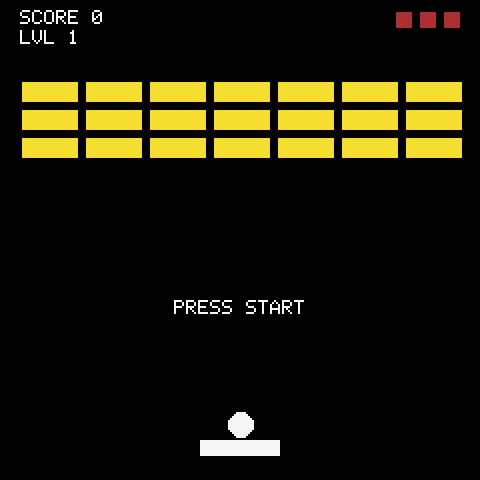
Classic Breakout: a paddle, a ball, and a wall of bricks. The ball bounces off walls and the paddle, bricks take multiple hits and change colour before they break, and every hit throws an Explosion burst off the impact point. Three lives, a score counter, and a level ladder that adds rows, carves gaps and raises hit points as you climb.
What this demo is really about is how physics, particles and audio sit on top of the scene without leaking into each other. BallActor is a RigidActor whose wall bounce is handled by the physics system and whose paddle english is applied in the collision callback; BrickActor is a StaticActor that disables its own collision layers the moment hp reaches zero; BrickBreakerScene owns the brick pool, the lives/score/level state and the single ParticleEmitter, and tells MusicPlayer what happened rather than how to sound.
Language: C++17
Engine: gperez88/PixelRoot32-Game-Engine@^1.9.0
Environments: native, esp32dev
Category: Games
Requirements (build flags)
Set in lib/platformio.ini (base template, inherited by every environment) and platformio.ini (per-environment):
| Flag | Set to | Why |
|---|---|---|
PIXELROOT32_ENABLE_PHYSICS | 1 | BallActor (RigidActor), PaddleActor (KinematicActor), walls and bricks (StaticActor). Without it nothing collides or bounces. |
PIXELROOT32_ENABLE_AUDIO | 1 | Five AudioEvents plus a looping MusicPlayer track. The most expensive gate: ~17 KB RAM for the scheduler's buffers. |
PIXELROOT32_ENABLE_PARTICLES | 1 | The single Explosion emitter on brick destruction. One emitter, fixed 50-particle pool, ~1.3 KB RAM. |
PIXELROOT32_ENABLE_UI_SYSTEM | 1 | Two UILabels — GAME OVER and PRESS START — owned by the scene. |
PIXELROOT32_ENABLE_DIRTY_REGIONS | 1 | Only changed regions are redrawn. No visual difference, less fill work on ESP32. |
PIXELROOT32_ENABLE_SCENE_ARENA | 1 | Scene entities are arena-allocated (set per-env in platformio.ini). |
PIXELROOT32_VELOCITY_DAMPING | 0.999 | Global velocity damping override for the physics step. |
PIXELROOT32_MAX_VELOCITY | 500 | Velocity clamp for the physics step. |
Engine features are compile-time modular, and a missing flag is usually not a compile error — it is a black screen or silence. Turning _PHYSICS off here gives you a paddle that moves and a ball that falls through everything. Turning _AUDIO or _PARTICLES off still compiles and simply drops that feedback channel — no call site changes, just no sound or no debris.
The sprite-depth flags are
#ifdef-tested, not#if-tested.PIXELROOT32_ENABLE_2BPP_SPRITESand_4BPP_SPRITESare checked with#ifdef(include/platforms/EngineConfig.h:399), so any value turns them on. Writing-D PIXELROOT32_ENABLE_2BPP_SPRITES=0links the 2bpp blitter in. Define the depths you want and omit the rest. The same trap applies to_SCENE_ARENA,_TILE_ANIMATIONS,_PROFILINGand_ENABLE_DEBUG_OVERLAY.
Platforms
| Environment | Display | Audio |
|---|---|---|
native | SDL2 window, 240×240 | SDL2_AudioBackend, 22050 Hz, 1024-sample buffer — in src/platforms/native.h |
esp32dev | ST7789 240×240 (TFT_MOSI 23, SCLK 18, DC 2, RST 4, SPI 40 MHz) | Default: ESP32_I2S_AudioBackend on BCLK 26 / LRCK 25 / DOUT 22, 22050 Hz — in src/platforms/esp32_dev.h. Comment documents the optional internal DAC backend on GPIO 25 instead. |
Display size is 240×240 in both platformio.ini environments (PHYSICAL_DISPLAY_*). LOGICAL_* defaults to the physical size — lowering it is the engine's main RAM lever on ESP32. Pin choices for I2S / DAC and the six-button InputConfig (SDL scancodes on native, GPIOs on ESP32) live in the same two platform headers.
Screen layout
 0  ┌────────────────────────┐
    │ SCORE 0          ■ ■ ■ │  HUD: score/level + lives (top bar, 20 px)
20  ├────────────────────────┤
    │                        │
    │   brick grid           │  7 cols × up to 7 rows, 30×12 px each
    │   32 px × 14 px pitch  │  offset centred, rows added/carved per level
    │                        │
    ├────────────────────────┤
    │         ●              │  ball (6 px, RigidActor)
    │      ▬▬▬▬▬▬            │  paddle (40×8 px, KinematicActor)
240 └────────────────────────┘BORDER_TOP is 20 px — the HUD strip where draw() writes SCORE / LVL and draws the three life rectangles. Walls are three invisible StaticActors (top + left + right, 10 px thick, setBounce(true)); the bottom is open and costs a life.
Controls
| Action | How |
|---|---|
| Move paddle | Left / Right (arrow keys on native, GPIO pad on ESP32 — see InputConfig in the platform header) |
| Launch ball | Start / Enter — ball is attached to the paddle until the first press, then launch({120, -120}) hands it to physics |
| Restart after game over | Start / Enter again — init() rebuilds the pool, resets score/lives/level and re-attaches the ball |
The paddle uses KinematicActor::moveAndSlide() with frame-rate-independent deltaTime scaling and screen-width clamping. The ball's pre-launch stick is not physics at all — attachTo(paddle) just follows the paddle position until launch() sets isLaunched = true.
Gameplay
Ball and paddle
BallActor (RigidActor, radius 6 px) and PaddleActor (KinematicActor, 40×8 px) demonstrate the hybrid collision model this engine encourages:
- Wall — fully automatic.
StaticActorwalls withsetBounce(true)andCollisionShape::AABB; physics reflects the velocity,onWorldCollision()only playsWALL_HIT. - Paddle — gameplay-modified.
onCollision()reads the hit offset across the paddle width and applies english tovelocitybefore physics integrates the next step. - Brick — gameplay-driven.
onCollision()callsbrick->hit(), awards score throughBrickBreakerScene::addScore(), and fires the emitter.
Collision filtering is four layers in src/GameLayers.h: BALL, BRICK, PADDLE, WALL. Bricks mask only BALL; the ball masks all three others.
Bricks and levels
BrickActor (StaticActor, 30×12 px, AABB, setBounce(true)) carries hp and active. getColor() maps hit points to a palette slot — 4 HP dark gray, 3 HP red, 2 HP orange, 1 HP yellow — with a black 1 px outline. hit() decrements hp and, at zero, clears both collision layer and mask so the dead brick costs no further checks.
Levels are built in loadLevel():
- Grid is 7 columns, spacing 32×14 px, centred via
offsetX. - Rows start at 3 and grow as
3 + level/2, capped at 7. - Even levels carve a checkerboard (
(row+col)%2==0skipped); level ≥ 3 carves a 3-wide gap in row 1. The result is a recognisable pattern per level without storing any level data. - HP scales with depth and level: level 1 is all 1 HP; later levels use
baseHP = rows - rowpluslevel/2, clamped to 1–4, so the back rows are always tougher.
Level clear is "no active brick left in the pool"; the scene then bumps currentLevel, rebuilds the grid and re-attaches the ball.
Object pool
Bricks are pooled, not allocated per level. init() pre-allocates MAX_BRICK_POOL = 64 (7×7 = 49 worst case, rounded to a power of two) as unique_ptr<BrickActor> and a bitset<64> tracks which slots are live. loadLevel() reuses slots, activeBrickCount avoids scanning the whole pool when it can. No new/malloc runs inside the game loop — the same discipline the engine's own demos teach.
Lives and score
Three lives, drawn as 8×8 red rectangles top-right. Falling below the bottom edge (position.y > logicalHeight) costs one life, plays LIFE_LOST, and re-attaches the ball; at zero lives gameOver = true stops the level check and shows GAME OVER / PRESS START TO RETRY. MusicPlayer is stopped on game over and restarted on the next launch.
Particles
One ParticleEmitter using ParticlePresets::Explosion, owned by the scene and exposed via getParticleEmiter() so BallActor can trigger it on BRICK_CRACK. Same pool size as the chess demo — 50 slots, ~1.3 KB — and the same engine detail: update() ages by one step per call, so stepping at a fixed rate decouples burst lifetime from frame rate. The preset is correct here because the background is GBC palette and the burst does not fade toward Color::Black (0x0000, transparent in the 8bpp ESP32 framebuffer).
Sound
Five one-shot cues in src/GameConstants.h (sfx::):
| Cue | Wave | What it is |
|---|---|---|
PADDLE_HIT | Pulse 520 Hz, 95 ms, duty 0.125 | Narrow pulse — the ball leaving the paddle. |
WALL_HIT | Pulse 205 Hz, 120 ms, duty 0.5 | Thicker duty than the paddle, lower pitch — a wall thud. |
BRICK_CRACK | Noise 900 Hz, 50 ms + INSTR_SNARE | Noise crumble overlay for the brick hit. |
LIFE_LOST | Pulse 290→95 Hz sweep, 400 ms | Falling sweep for losing a life. |
START_GAME | Pulse 1500→420 Hz sweep, 180 ms + INSTR_PULSE_LEAD | Rising sweep for launch / level clear / restart. |
All cues are AudioEvent aggregates assigned by named fields, played with engine.getAudioEngine().playEvent(sfx::...). Build with -D PIXELROOT32_ENABLE_AUDIO=0 for a silent build — call sites still compile, they just do nothing.
BGM is a looping MusicPlayer track in src/assets/BrickAudioTracks.h:
- Triangle bass — root–fifth walk (Am / G / F / G) in eighth notes.
- Pulse lead — arpeggiated C–E–G / G–B–D / F–A–C / G–B–D pattern.
- Drums — kick / hihat / snare grid (
INSTR_KICK/HIHAT/SNARE). - Loop is 16 beats (32 eighths); durations are in beats where quarter = 1.0.
BGM_STAGEis aMusicTrackwithWaveType::TRIANGLE; tempo is1.18 + (level-1) * 0.032viatempoForLevel()and refreshed on everyloadLevel()andsetupMusic()so later levels push slightly faster.
MusicPlayer is created in the scene constructor with master volume 0.6 and stopped explicitly on game over.
Build
pio run -e native                    # SDL2 simulator
pio run -e native --target exec      # build and run it
pio run -e esp32dev                  # ESP32 firmware
pio run -t clean -e nativePlatformIO fetches the engine itself — gperez88/PixelRoot32-Game-Engine@^1.9.0, which in turn pulls gperez88/PixelRoot32-APU@^2.0.0 for the audio core — so no local engine checkout is needed. Native builds also need SDL2: from MSYS2/MinGW on Windows, libsdl2-dev on Linux, brew install sdl2 on macOS. The platformio.ini here ships with the Windows/MSYS2 include and library paths; remove the -IC:/msys64/..., -LC:/msys64/... and -mconsole flags on the other two, and on macOS uncomment the Homebrew lines next to them.
Upload (ESP32)
pio run -e esp32dev --target upload
pio device monitor # 115200 baudProject layout
brick_breaker/
├── platformio.ini            # native + esp32dev
├── lib/platformio.ini        # shared base flags and engine feature switches
└── src/
    ├── main.cpp              # platform selector only
    ├── BrickBreakerScene.h/.cpp # scene, level gen, lives/score, music control, brick pool
    ├── GameConstants.h       # dimensions, BTN_* ids, sfx:: AudioEvents
    ├── GameLayers.h          # BALL / BRICK / PADDLE / WALL collision layers
    ├── actors/
    │   ├── BallActor.h/.cpp    # RigidActor, attach/launch/reset, english + brick hit
    │   ├── PaddleActor.h/.cpp  # KinematicActor, horizontal input + clamping
    │   └── BrickActor.h/.cpp   # StaticActor, hp/active, colour by hp, hit()
    ├── assets/
    │   └── BrickAudioTracks.h  # BGM_STAGE MusicTrack + tempoForLevel()
    └── platforms/
        ├── native.h          # SDL2, provides main()
└── esp32_dev.h # ST7789 + I2S (or DAC), provides setup()/loop()Memory
Nothing allocates in the loop. Bricks are pooled at init() time, walls and paddle/ball are fixed unique_ptrs, and the emitter's 50-particle pool is a single fixed allocation. MAX_BRICK_POOL = 64 is sized for the worst-case 7×7 grid.
The demo's own RAM is dominated by that pool and the emitter (~1.3 KB for particles plus ~64 × BrickActor); the two large costs are the engine's, not the game's: the 8bpp logical framebuffer is 240×240 = 57,600 bytes and the audio scheduler is about 17 KB.
Not in this version
- Power-ups / multi-ball — would need a ball pool and a drop table that dwarf the current scene.
- Saved high score — the ESP32 build has no filesystem configured.
- Touch / mouse aiming — input is the six-button
InputConfig; the paddle is digital left/right by design. - Sprite art for bricks — bricks are filled rectangles tinted by
hpso the demo stays focused on physics and pooling rather than asset generation.
Engine documentation
Source code: https://github.com/PixelRoot32-Game-Engine/PixelRoot32-Demo-Projects/tree/main/games/brick_breaker